Vibe coding with Replit - everyone can build the app
Today I want to show you what vibe-coding is and prove that you can build an app yourself — no developer, no coding, no technical experience needed.
Sounds too good to be true? I thought so too. So I tested it.
## From Idea to App
I needed an idea for my first app. Instead of forcing something, I asked myself a simple question: what problem can I solve?
And then it hit me — birthdays. Every year the same story: someone close to me has a birthday, and I find out too late to buy a gift. I have an Excel with dates, but Excel won't send me a reminder 14 days in advance.
Goal: an app that keeps track of birthdays for me.
## What Is Vibe-Coding?
Vibe-coding is building apps by having a conversation with AI. You don't write code — you describe what you want, and AI builds it. You speak like a human, you get a working app.
Sounds like magic, but it's simply a new way of creating things. And it's available to everyone.
## The Tool: Replit Agent
I used Replit — an online platform for building applications. They have Replit Agent: you describe what you want, and AI writes the code, sets up the database, spins up the server and publishes your app under a real link.
How much does it cost?
- Replit Core: $25/month
- You can buy additional credits for extra Agent usage
- Your app gets a free .replit.app domain
For comparison — hiring a developer for an app like this would cost thousands and take weeks. Here? One afternoon ☕
## Before You Start — FAQ for Non-Programmers 🙋♀️
"But I really don't know anything technical"
Neither do I. Seriously. I run a startup — I don't write code for a living. If you can write an email, you can vibe-code. It's literally writing messages.
"What if something breaks?"
You write to the Agent: "Something's not working, when I click X then Y happens" — and it fixes it. You don't need to know why it broke. Just like you don't need to be a mechanic to tell the garage what's wrong.
"Do I need to install anything?"
No. Everything runs in your browser. Go to replit.com, log in and start. Zero installation.
"What if I don't know what to write to the Agent?"
Start with the problem, not the solution. Don't write "build me a React app with PostgreSQL". Write like a human: "I want an app where I enter my friends' birthdays and get email reminders." The Agent handles the technical stuff.
"How long does it actually take?"
My app from zero to published version — one afternoon. First something-that-works? 15 minutes.
"What if I want to change something visual?"
You can attach screenshots or photos to your messages! For example, a photo of your sketch on paper or a screenshot of another app with a comment "I want it to look similar to this". The Agent understands images.
## My Process (Step by Step)
### 1. Paper First, Not Keyboard ✏️
Before I opened Replit, I grabbed a piece of paper and sketched out:
- What does the homepage look like?
- How does login work?
- What does the user see after logging in?
This is the most important step. Without a plan, AI doesn't know what you want, and you don't know if the result makes sense. 5 minutes with a pen saves an hour of corrections.
### 2. Plan, Not Build! 📋
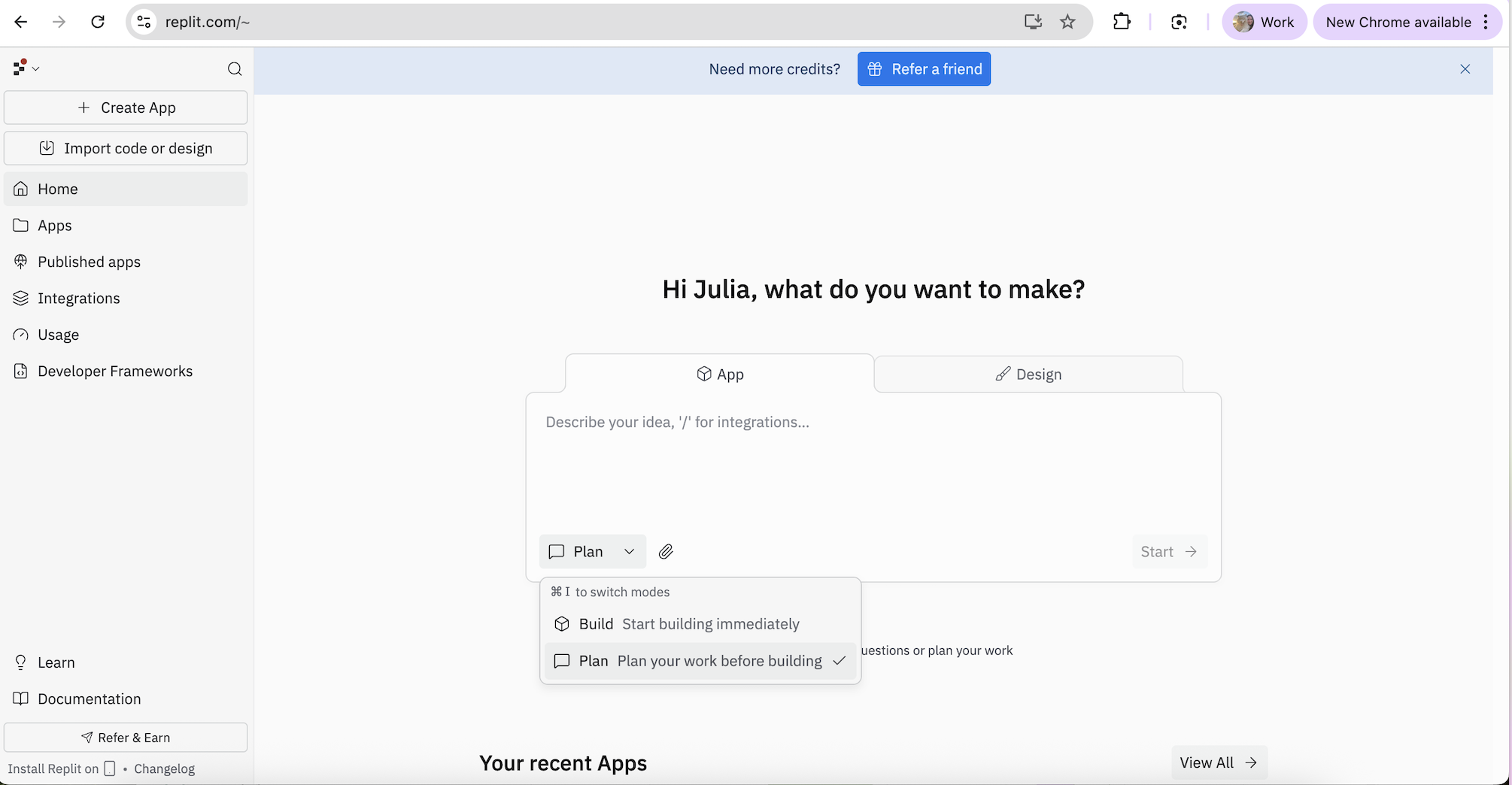
When you go to replit.com and create a new project, you'll see two modes:
- Build — starts building immediately
- Plan — plans first, builds after
Choose Plan! This matters. The Agent will first analyze your idea, outline what's needed (database, screens, features) and only then start coding. This gives you control over what's being created — you can say "no, change this" before it writes a single line of code.
Build is tempting (because it's faster!), but Plan gives better results.
# 3. Describe What You Want 💬
In the text box, describe your app in plain language:
"Build a birthday reminder app. Users add names and dates manually or by uploading an Excel file. The app sends emails 14, 7, 5, 3, 2, 1 days before and on the birthday. Dashboard showing upcoming birthdays. Clean design in pink and white."
The Agent creates a plan, you approve it, and watch it build your app live.
### 4. Chat and Iterate 🔄
The first version won't be perfect — and that's OK. Every change is just another message:
- "Add a landing page with feature descriptions"
- "Add support for Polish month names"
- "Make the headline catchier"
Like a conversation with a developer who never gets tired and never gets offended by changes.
### 5. Publish With One Click 🚀
Click Publish — your app is live. Real link, real website. Done in seconds.
## The Result
Here's what I built in one afternoon:
App Map — birthday-buddy-reminder.replit.app
If you'd like to get the code, feel free to reach out! :)
Let's walk through the finished app screen by screen. This will help you see what was actually built — and what to tell the AI Agent to build something similar.
Screen 1: Landing Page (Welcome Page) 🎂
The first thing you see when you click the link:
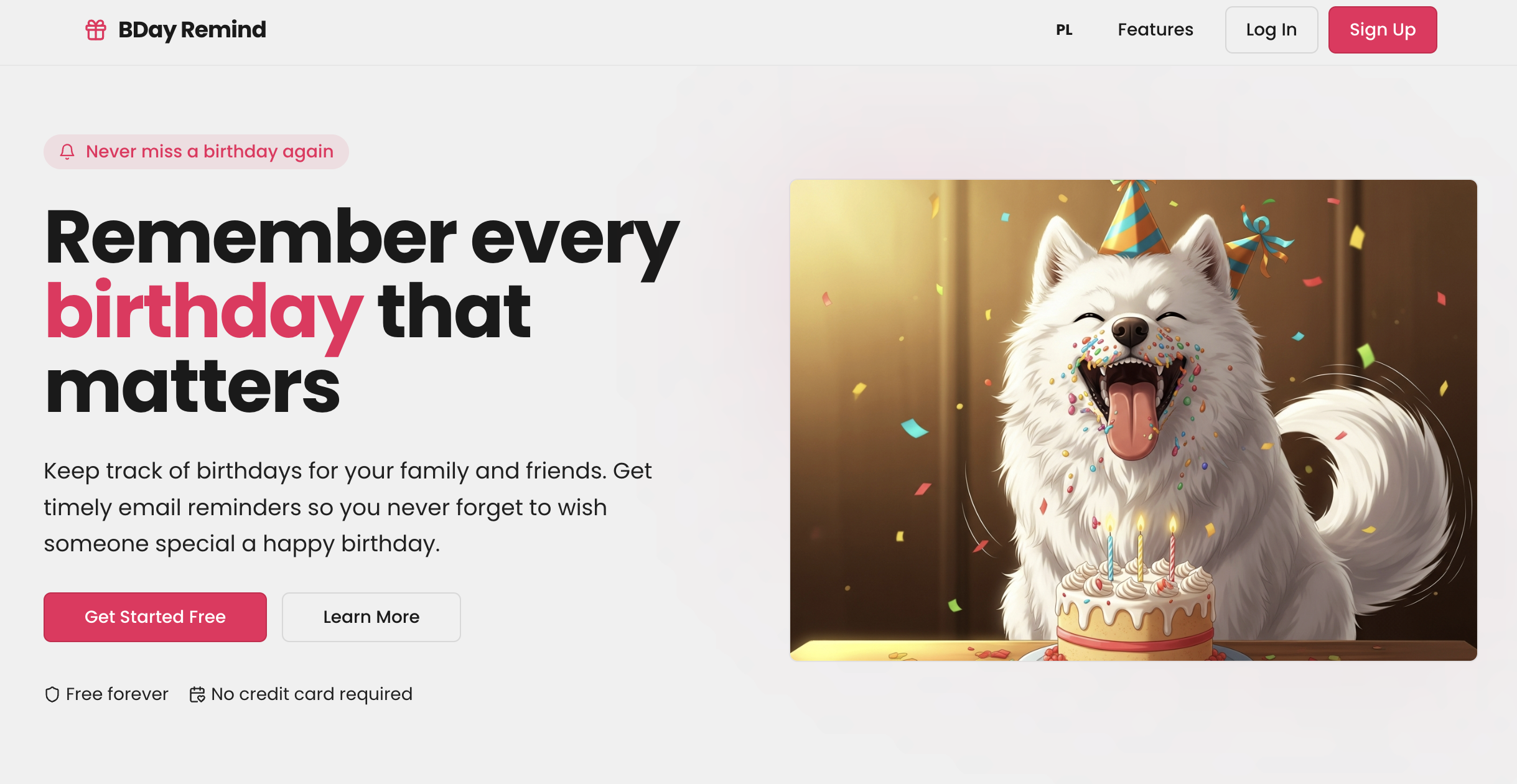
- Big Header — "Never miss a birthday that matters."
- Cute dog in a party hat 🐕🎉
- Two buttons: "Start for Free" (leads to registration) and "Learn More" (scrolls to features).
- "Always free / No credit card required."
- "Everything you need" section — 6 feature cards.
- Bottom: "Ready to start?" with another call-to-action button.
- Top Nav: PL/EN toggle, Features, Login, Sign Up.
Screen 2: Registration with Access Code 🔐
⚠️ Important! The app is protected by an access code. Why? Because running an app costs money (sending emails, database hosting). If you give the code to everyone, the bill might surprise you.
What it looks like:
- Gift icon 🎁
- "Join BDay Remind"
- "Enter Access Code" field.
- "Continue with Google" button — Once the code is in, you sign in with Google, Apple, or email.
- No code = No entry.
- Tip: Only give the code to your inner circle. This is your private tool. 🤫
Screen 3: Sign In ✅
After entering the code, you'll be redirected to Replit (the platform that hosts the app). There you choose how to sign in: Google, Apple, or email. Click, pick your account — done. No passwords to remember. Replit handles the security for you.
Screen 4: Dashboard (Main Panel) 🎯
The heart of the app. Once logged in, you'll see:
- Email Notifications — A toggle on/off at the top with info on which email is being used.
- Search Bar — "Search names..."
- Three buttons: "Add" (manual), "Import" (Excel), "Bulk" (set a schedule for everyone at once).
- Birthday List — featuring initials, dates, countdowns ("25 days left"), reminder icons, and Edit ✏️ / Delete 🗑️ buttons.
Screen 5: Adding a Birthday ➕
Click "Add" to see the form:
- Name — e.g., "Anna Smith"
- Day / Month (dropdown menu) / Year (optional).
- "Remind me" — Checkboxes for 14, 7, 5, 3, 2, 1 days before + on the day.
- Defaults: 7 days + 1 day + day of — but you can customize this for every person!
- Pro Tip: Import from Excel by uploading a .xlsx file. The app understands both "February" and "Luty" 🇵🇱🇬🇧.
Reminder Schedule ⏰
Two ways to set it:
- Per person — select specific days when adding/editing.
- Bulk — the "Bulk" button sets the same schedule for everyone at once. Options: 14, 7, 5, 3, 2, 1 days before + day of. Reminders are sent automatically to your email — you don't have to click a thing.
On every screen: Language Toggle 🌍
There is a PL/EN switch in the corner. One click changes the entire interface — buttons, labels, and alerts. Both Polish and international friends can use the app in their language.
What's working — Full Feature List ✅
- ✅ Landing page with a dog in a party hat 🐕
- ✅ Access code protection
- ✅ Sign in via Google, Apple, or email
- ✅ Dashboard with countdowns
- ✅ Search functionality
- ✅ Manual adding with per-person customization
- ✅ Excel Import (supports PL and EN month names!)
- ✅ Bulk schedule settings
- ✅ 14/7/5/3/2/1 + Same-day reminders
- ✅ Edit and Delete entries
- ✅ Email notification toggle (On/Off)
- ✅ PL/EN Language toggle 🌍
- ✅ Responsive design — works on phone and desktop
How to talk to the Agent — Cheat Sheet for Non-Coders 🗣️
The Agent is your programmer. You don't tell it HOW to code — you tell it WHAT you want to see:
- Describe the look: "I want a big 'Welcome!' title at the top with two buttons side-by-side underneath it."
- Report a bug: "When I click the 'Add' button, nothing happens. It should open a form."
- Request a change: "Change the background color to light pink. Make the buttons rounded."
- If you don't like something: "The dashboard looks cluttered. Simplify it — fewer elements, more white space."
- Visual cues: You can also paste a screenshot and say: "I want it to look like this image" — the Agent understands pictures!
## Ideas for Your First App 💡
Not sure what to build? Think about a problem you currently solve with Excel, a piece of paper, or just your memory:
- 📚 Reading List — with ratings and status.
- 🏋️ Workout Tracker — what you did at the gym.
- 🍽️ Meal Planner — a weekly menu.
- 🎁 Wishlist — a list of wants with gift links.
- 🐕 Pet Tracker — vet visits, meds, vaccinations.
- 💰 Expense Splitter — who owes what after a trip.
- 📝 Gratitude Journal — 3 things you're grateful for every day.
Each of these ideas is just one prompt and one afternoon in Replit away.
## Tips If You Want to Try It
1. Start with a problem — What's bothering you? That's your app.
2. Sketch it on paper — A plan beats a random prompt.
3. Choose "Plan," not "Build" — Give the Agent a moment to think it through first.
4. One thing at a time — Ask for one feature at a time, not everything at once.
5. Test after every change — Click, check, and fix.
## Summary
You don't need to be a programmer to build an app. You don't need to spend thousands on a developer. All you need is an idea, a piece of paper, and $25 a month.
Vibe-coding isn't the future — it's the present. And it's for everyone.
Now excuse me — I need to go buy a gift. The app just reminded me! 😉🎂
