Meeple Log — How I Built My Own Board Game Journal 🎲🐾
My attempts to stop buying board games usually follow the same pattern: I officially declare a buying ban, feel extremely proud of myself, and about a week later a courier shows up at my door. 😆 A friend once suggested that instead of promising myself yet again that I was “definitely not buying anything else,” I should start collecting data. What do I actually play? Which games do I keep coming back to? Which ones do I still rate highly after several plays, and which ones just look beautiful on the shelf while patiently waiting for their second outing? Board gamers obviously already have apps for this. I have BG Stats. I have BG Catalog. And I don’t really like either of them. Not because they’re bad. I’ve simply reached the dangerous stage of vibe-coding where, instead of thinking, “Oh well, I’ll use what already exists,” I think: “Fine. I’ll build my own.”
And that’s how Meeple Log was born — my private board game journal, built in Replit with the help of AI. I wanted to create my own little board game Marie Kondo: something that would show me which games I genuinely return to, which ones I keep skipping when choosing what to play, and what kinds of games actually make me happy. Because “beautiful box” and “I love playing this” are unfortunately two very different categories. 😆 A collection list alone can’t tell me that. I needed a history of my plays and my own impressions. And this time, you can try the result yourself. Meeple Log is available to everyone — no access code required. Just open the app, create an account or sign in with Google, and you can click around for yourself. Every user gets their own private journal, so feel free to add a few test plays and see how everything works. 🎲
What Is Vibe-Coding? A Quick Refresher 💬
Vibe-coding means building an app by talking to AI. I don’t write the code myself — I describe what I want, the Agent builds it, I click through the result, and then I explain what works, what doesn’t, and what needs changing. If you’ve read my previous articles, you already know the general rhythm: idea → plan → build → test → tweak → test again. For Meeple Log, I used Replit Agent again. I don’t need to know how to technically build authentication, a database, or a statistics dashboard. What I do need to know is what the user should be able to do and what should happen next.
Tool: Replit Agent.
Cost: When I built Chaos Tamer, I was using Replit Core at $25/month. Replit also uses credits for Agent work and services needed to run an app, so the total cost of a project can be higher. It’s best to check Replit’s current pricing directly.
Publishing: the app is live at meeple-log.replit.app.
Workflow: plan first, then build, test, and improve through conversation with the Agent.
The important thing is not to start with the colour of a button. Start with the question: what do I actually want this app to help me do or understand?
First, Work Out What Connects to What ✏️
In my case, the basic flow was fairly simple. After playing a game, I want to log the session. That entry should appear in the history of that particular game. The history should feed into my statistics, and I also wanted to use the same data later for monthly summaries on my board game Instagram. In other words, one entry should be useful in several different places. It sounds obvious, but it helps enormously when designing an app. Instead of inventing a statistics screen, a history screen, and a monthly report separately, ask yourself: what information do I need to save once so I can use it everywhere later?
Plan First, Build Second 📋
In Replit, it’s worth starting with a plan before letting the Agent build anything. My initial prompt could be simplified to something like this:
Build an app called Meeple Log — a private board game journal. Add Google login and separate data for each account. I want to record the game title, date, whether I played solo or with other people, number of plays, scores, ratings, and comments. Each game should have its own history and cover image. Add statistics that help me see which games I return to and which ones I like most, as well as a monthly Instagram summary. Give it a warm, friendly visual style. First, propose a plan.
And this part matters: I’m not telling the AI how to code it. I’m telling it what I need. “I want to record five games from one evening, each with a different score” explains the requirement much better than simply saying “add a score field.”
Use Real Situations to Refine It 💬
The interesting problems only appear once you start actually using your app. One evening at the table might contain three separate plays. A game might have several boards, scenarios, or difficulty levels. And “I played board B” is not the same thing as “I personally found this game very difficult.” That’s when the real conversation with the Agent begins: “Let me record several plays in one entry, with a separate score for each one.” “Keep the game variant separate from my personal difficulty rating.” “Remember people I’ve played with so I can select them again.” “Ratings and comments should be optional. Sometimes I just want to record that I played.”
Then there’s your own vocabulary. In my app, “love it,” “great,” “okay,” and “absolutely not” are perfectly legitimate research categories. 😆 I can even change those labels in the settings without rewriting all my old entries. I’m not designing an app for an academic committee. I’m designing it for myself.
Think About Privacy from the Start 🔐
I wanted Meeple Log to be a private journal, not another social network. Every user has their own account and can only see their own games, scores, comments, and statistics. That’s something you should tell the Agent explicitly: “Each user should only be able to view and edit their own data. Make sure this also applies when opening direct links to games and individual play records.” Then test it with two separate accounts. The fact that an app has a Log In button doesn’t automatically mean user data is properly separated. AI builds it, but you still need to test it.
Add the Things That Are Useful to You 🔄
I run a board game Instagram account, so at some point I naturally thought: if I’m already collecting all this data, why am I still creating my monthly recap manually? So I added a feature that creates graphics and draft post text based on the games I played in a selected month:
Create an Instagram carousel and post caption using plays from the selected month. Show game titles and number of plays on the graphics, but leave out private comments, ratings, scores, and player names. Do not publish anything automatically.
And this is one of my favourite things about building your own app. You don’t have to wait for the developers of an existing product to decide that your oddly specific need is popular enough to make it onto their roadmap. You can simply say: “I need this” and try to build it.
The Result — Let’s Walk Through the App 🎲
Here’s a quick tour of Meeple Log. I’m not going to dissect every single button — just show you what I built and what each part is for. And if you’d rather see it live, you can open the app, create an account, and click along as you read.
Screen 1: Home Page — Me and Pablo 🐾
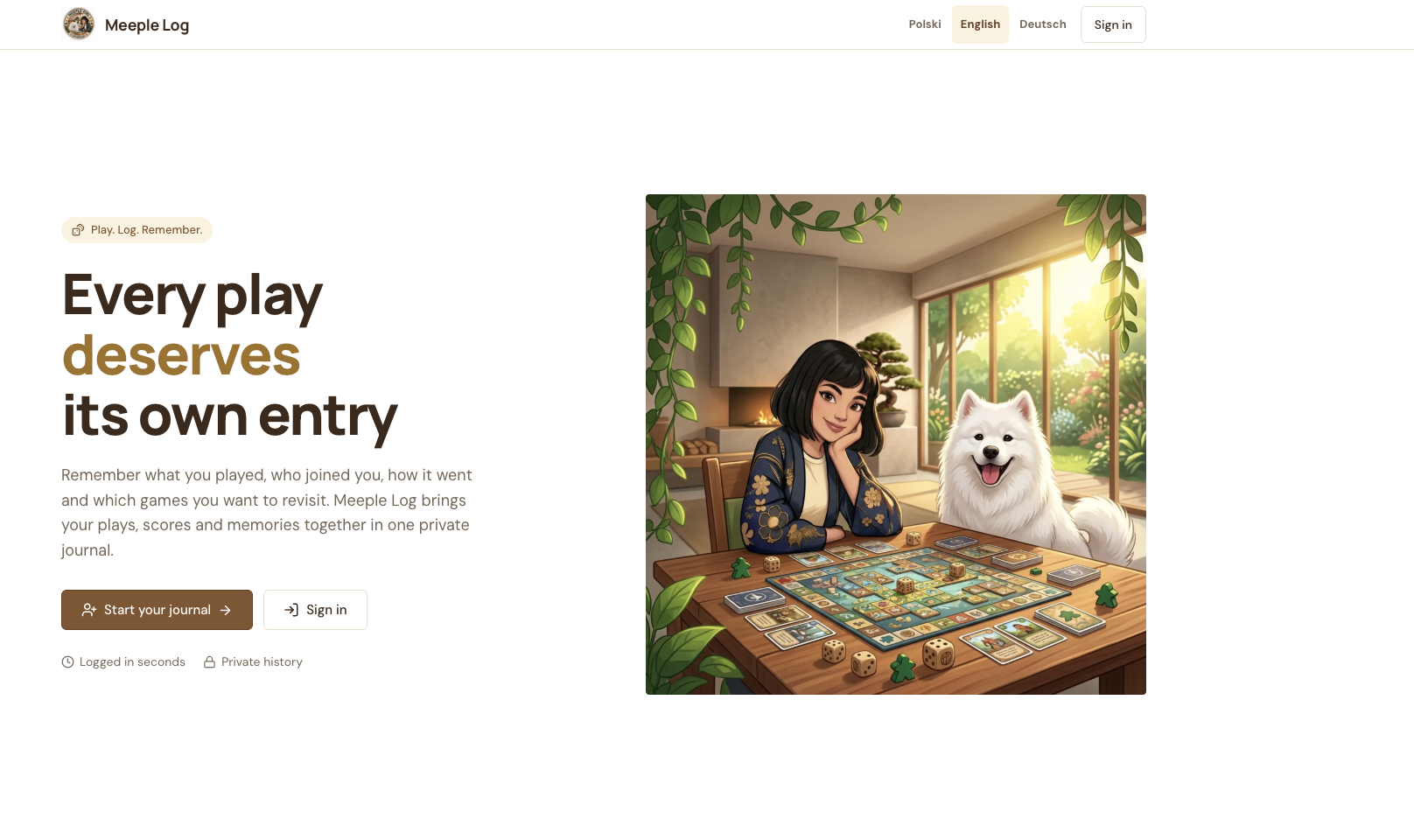
The first screen features an illustration based on my Instagram logo — me and Pablo sitting at a board game table :). Next to it is the slogan “Unfold Your Journal.” From here, you can start your journal, log in, or change the language. The two main ideas are simple: log a play in seconds and keep a private history. Every user has their own account and only sees their own plays, ratings, and statistics.
Screen 2: Your Account — Your Own Private Journal 🔐
After clicking “Start Your Journal” or “Log In,” you can create an account using your email and password or simply continue with Google. If you already have an account, you go straight to the login screen. There’s no access code. Meeple Log is open to everyone, so if you want to try it, just sign up and you’ll have your own journal to explore.
Screen 3: Games — What Do I Actually Return To? 🎲
Once I’m logged in, I see a list of games with their cover images. Each title leads to its own history, where I can check how many times I’ve played it, when it last made it to the table, and how my impressions have changed over time. The distinction between a session and a play also matters. I can record an entire evening as one session while still counting all the individual games correctly. I can also export my history to Excel.
Screen 4: “How Did It Go?” — Logging a Play ✍️
This is the most important form in the entire app. I can record whether I played solo or with someone else, the number of plays, scores, expansions, variants, my rating, and my own impressions. Not everything is mandatory, because I didn’t want logging a board game night to feel like completing a small tax return. Sometimes “love it” is enough. 😆
Screen 5: Game History — A Diary of Progress and Mistakes 📖
Every game has its own history. I can see previous plays, scores, and comments, edit old entries, or compare results. My Cascadia: Rolling Rivers, for example, has scores of 11 and 112 points. Yes. In the same game. Understanding the rules can work miracles. 😂
Screen 6: Statistics — My Board Game Marie Kondo 📊
This is really why Meeple Log exists. I can see my most-played games, highest-rated games, and titles that haven’t made it to the table for a long time. Not playing something for a while doesn’t automatically mean it needs to leave the collection, but frequent plays combined with high ratings are a pretty useful clue about what kinds of games I should be looking for when I buy something new. And if I’ve been saying “I love this game” for two years but haven’t played it once in those two years… well, at least now we have something to discuss. 😆
Screen 7: My Month on Instagram — THIS WILL BE USEFUL 📸
I choose a month and a graphic version, and the app prepares downloadable slides and a draft caption for me to copy. All that’s left is to add something personal and publish it. For example, an explanation of those 11 points. Although perhaps some things are better kept private. 😂
Screen 8: Import — No Need to Start from Zero 📂
If you’ve already been collecting your gaming data somewhere else, you don’t have to re-enter everything manually. Meeple Log can import a BGG collection from CSV or a backup of your BG Stats history. For games played on BGA, there’s also a route through BG Stats and file export. First you see a preview, and only then do you confirm the import. And what if I only remember that I’ve played a particular game around thirty times, with absolutely no idea when play number seventeen happened three years ago? That’s fine too. I can simply add the total number without a date. I’m not inventing a fictional Tuesday just to make the statistics look tidy.
Screen 9: Settings — “Absolutely Not” Is Also an Option 😏
In the settings, I can change my own opinion labels and arrange them in whatever order I want. It’s a tiny feature, but things like this are exactly why I enjoy building my own tools. I don’t have to adapt my language to the app. The app can adapt to mine.
How to Talk to the Agent — A Tiny Cheat Sheet 🗣️
The rule that helps me most is: describe the situation, not the code. “I play three games in one evening and want to save them together.” “I want to know which games I genuinely enjoy so I can make better choices when buying new ones.” “If I don’t know the dates of older plays, keep only the total number.” “I logged three plays, but the statistics count only one. It should show three plays and one session.” You don’t need to know how to achieve the result technically. You need to explain what is happening now and what should happen instead.
Build, Use, Improve 🔄
You don’t need to start with everything Meeple Log has today. At the beginning, a simple form for logging a play and a list of games is enough. Add a few real entries, use the app for a couple of days, and you’ll quickly discover what you genuinely need and what only sounded brilliant while you were planning it. When something goes wrong, don’t just tell the Agent “it doesn’t work.” Give it a specific scenario: “After adding three plays in one entry, the statistics show one. I want it to count three plays and one session. Also check the game summary and monthly report.” The more specific the example, the easier it is to test whether the fix actually worked.
So, What Did Meeple Log Teach Me?
With Chaos Tamer, I wanted confetti and a garden that grew along with my completed tasks. With Meeple Log, I wanted to understand my own board gaming habits a little better. What actually makes it to the table? What do I only love in theory? What do I keep returning to? And what kinds of games should I look for in the future because those are the ones I genuinely enjoy playing?
The more of these little apps I build, the more I appreciate one particular thing about vibe-coding. It’s not about everyone suddenly having to launch a startup. It’s about being able to build a small tool designed around your own life. Not for a million users, investors, or some giant product roadmap. For you. Even if the problem you’re trying to solve is the fact that you own far too many board games.
Will Meeple Log finally stop me from buying more of them? I don’t have that much faith in technology. 😆 But at least I’ll have the data. And this time, you can try the whole thing yourself: Meeple Log is open to everyone and doesn’t require an access code. Just create an account or sign in with Google, then click around, log a few games, and see whether a little board game Marie Kondo might be useful for you too.
🔗 Meeple Log: https://meeple-log.replit.app/
Now, if you’ll excuse me, I need to play something. For app-testing purposes, obviously. 😉🎲
